Cumulocity is made up of several components, each handling a distinct part of the flow from device data to applications. The domain model section describes how Cumulocity structures its data. This section explains how that data moves through the system, and what each component is responsible for.
Two views make up the picture. The data flow architecture follows data in real time, from a device through ingestion, preparation, storage, and analytics — and back again to close the loop. The application architecture shows how applications and business logic build on top of the platform core and its stores to deliver value to users. A consistent set of extension points spans both, so you can adapt the platform to your solution without modifying it.
Data flow
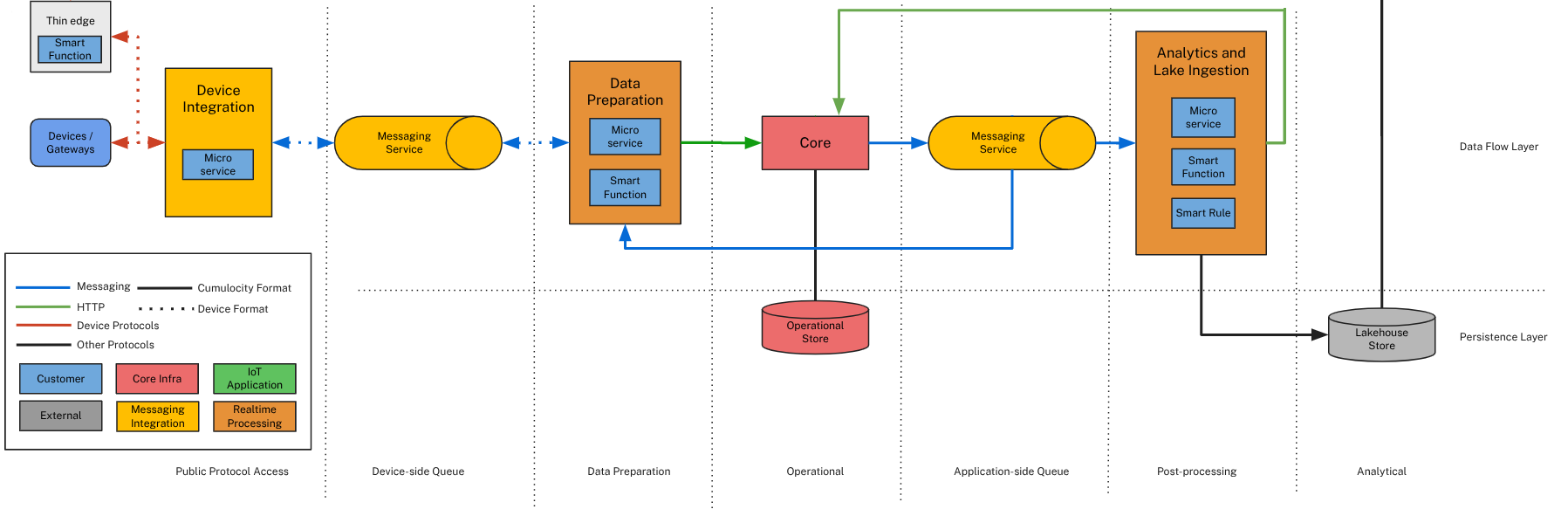
The data flow architecture follows data through Cumulocity in real time, from a device on the left to storage and analytics on the right. Each stage has a single, clear responsibility, and a Messaging Service decouples the high-throughput stages so that each one can scale and operate independently.
The diagram is a high-level view. The routes described below fill in detail that it glosses over.
Device integration connects devices to the platform. The route data takes depends on the protocol and the format the device sends:
Devices connecting over REST send data directly into the core, already in the Cumulocity domain model format.
Devices connecting over MQTT have two options. They can publish SmartREST directly into the core — a defined format that the core automatically converts into the domain model — or they can connect through the MQTT Service in their own device-specific format.
thin-edge.io automatically converts its data to SmartREST and delivers it to the core.
Other protocols, such as OPC UA, LWM2M, and fieldbus protocols, use their own integrations to bring data into the core.
The Messaging Service is the platform’s internal messaging backbone, powered by Apache Pulsar. On the device side, it carries only the MQTT Service traffic to Data Preparation, buffering and distributing it reliably and durably so that a burst of device traffic never overwhelms the components downstream.
Data Preparation turns the device-specific messages from the MQTT Service into Cumulocity’s domain model. It does this with a smart function — or a custom microservice for more complex cases — and can also normalize, enrich, or filter the data before storing it.
The core is the heart of the platform, where all paths converge. It holds data in the operational store and serves the live state of the system — inventory, measurements, events, alarms, and operations — through its APIs. This is the system of record for current and recent data.
A second, application-side Messaging Service makes data in the core available to everything that consumes it: applications, streaming analytics, and ingestion into the data lake. This second decoupling lets read-side consumers scale independently of ingestion.
Analytics and lake ingestion acts on live data and archives it. Streaming Analytics processes data as it arrives, and Streaming Lake Ingestion continuously offloads it into the data lake. Analytics results loop back into the core — raising an alarm, or sending an operation to a device — which closes the real-time control loop back to the equipment. You extend this stage with a microservice, a smart function, or smart rules for no-code automation.
Two stores sit beneath the core, each optimized for a different job:
The operational store holds current and recent data for fast, real-time access by every component.
The data lake holds a continuously updated, permanent archive of all data in open Apache Iceberg tables, ready for large-scale historical analysis and AI. Streaming Lake Ingestion writes data there continuously, and DataHub can also offload and query it.
Application architecture
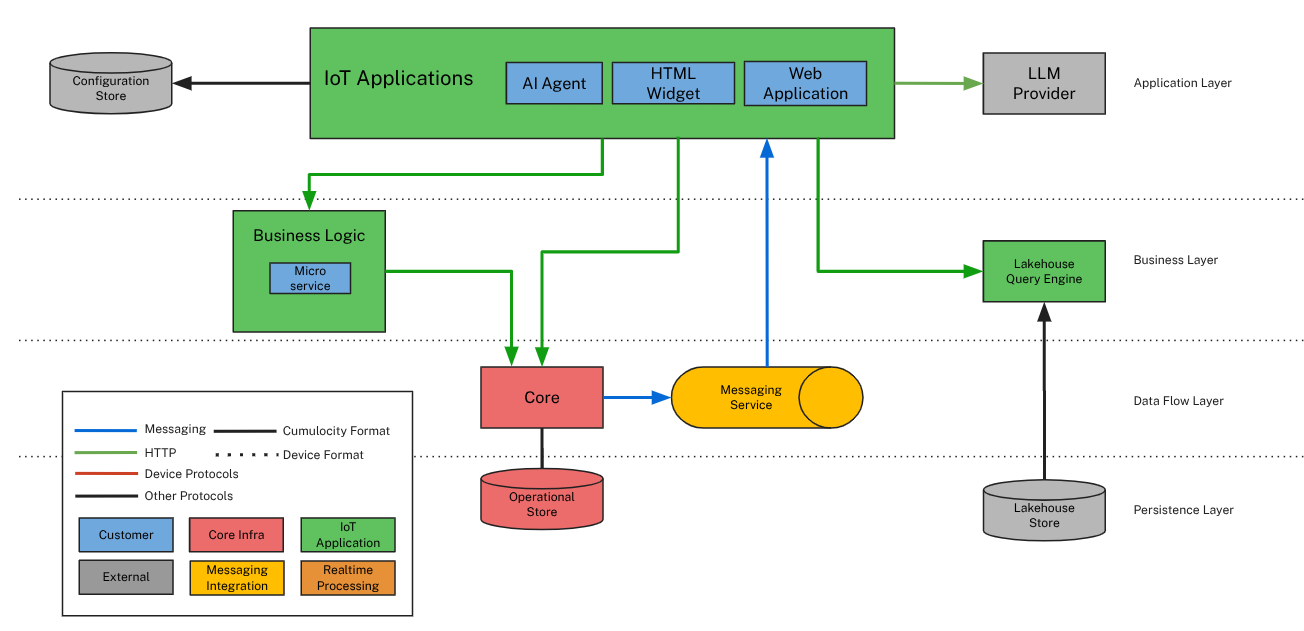
The application architecture shows how applications and business logic build on top of the platform core and its two stores to deliver value to users.
The core and its stores — described in Data flow — are the shared foundation. Everything above them works against the same live domain model in the operational store, and the archive in the data lake.
Business logic runs as server-side microservices alongside the platform’s own services. Use it to add custom server-side behavior, or to integrate Cumulocity with external and enterprise systems such as ERP or CRM.
Data lake query gives applications and analytics tools access to the archived data in the data lake. Because the data lake uses open Apache Iceberg tables, tools can query it both from within Cumulocity and from outside — notebooks, AI/ML platforms, and business intelligence tools — through Streaming Lake Ingestion and DataHub. This is where large-volume, historical, and cross-system analysis happens.
IoT applications are the user-facing layer. Web applications and dashboards present the state of the system and let users act on it, and the Messaging Service delivers real-time updates so those displays stay live. You extend this layer with web applications, HTML widgets, and AI agents that bring generative and agentic AI directly to the user.
Extension points
Both architectures share a consistent set of extension points, so you can adapt the platform to your solution without modifying it. The same building blocks appear wherever they apply:
Stage or layer
Extension points
Device integration
Microservice
Data Preparation
Microservice, smart function
Analytics and lake ingestion
Microservice, smart function, smart rules
Business logic
Microservice
IoT applications
Web application, HTML widget, AI agent
Microservices are fully independent services with their own lifecycle. Use one when you need a long-running, self-contained component — a custom protocol, a complex integration, or dedicated server-side logic.
Smart functions embed lightweight Javascript logic directly inside a component, such as a Data Preparation rule or a Streaming Analytics model. There is no container to build or deploy — use them for targeted transformation, enrichment, or analytics logic.
Smart rules apply a Streaming Analytics model to automate a common real-time reaction. A set of defaults is available out of the box, and you customize their behavior with your own analytics models.
Web applications and HTML widgets customize the user-facing layer, from an individual dashboard widget to a complete application.
AI agents bring generative and agentic AI into applications, grounded in your platform data.