
Overview
Overview
The Notifications 2.0 API allows applications or microservices to receive and process notifications generated by the use of the Cumulocity REST or MQTT APIs (device management, measurements, alarms, events and other platform APIs) in a reliable manner.
Notifications 2.0 improves upon the Real-time notification API by providing stronger delivery semantics and ordering guarantees. It is also intended to be simpler to use than the “Bayeaux” protocol used in the Real-time notification API. New capabilities are added to Notifications 2.0 in each release of Cumulocity. However, it does not yet support all of the notifications available from the Real-time notification API so it is not yet a complete replacement for the older API. See also the Notifications API documentation for full details of the notifications supported by this release of the Notifications 2.0 API.
Topics and subscriptions
Internally, Notifications 2.0 uses a publish-subscribe pattern, allowing use cases to organize their desired selections of measurement, event, alarm, operation and/or inventory messages into topics according to functional interest.
Creating a Notification 2.0 subscription in Cumulocity creates a publisher (internally), that forwards Cumulocity messages that it matches (based on message qualities such as its source, type or even content, for example) to a specific topic. Each subscription can only forward messages to one topic, but multiple subscriptions can forward messages to the same topic.
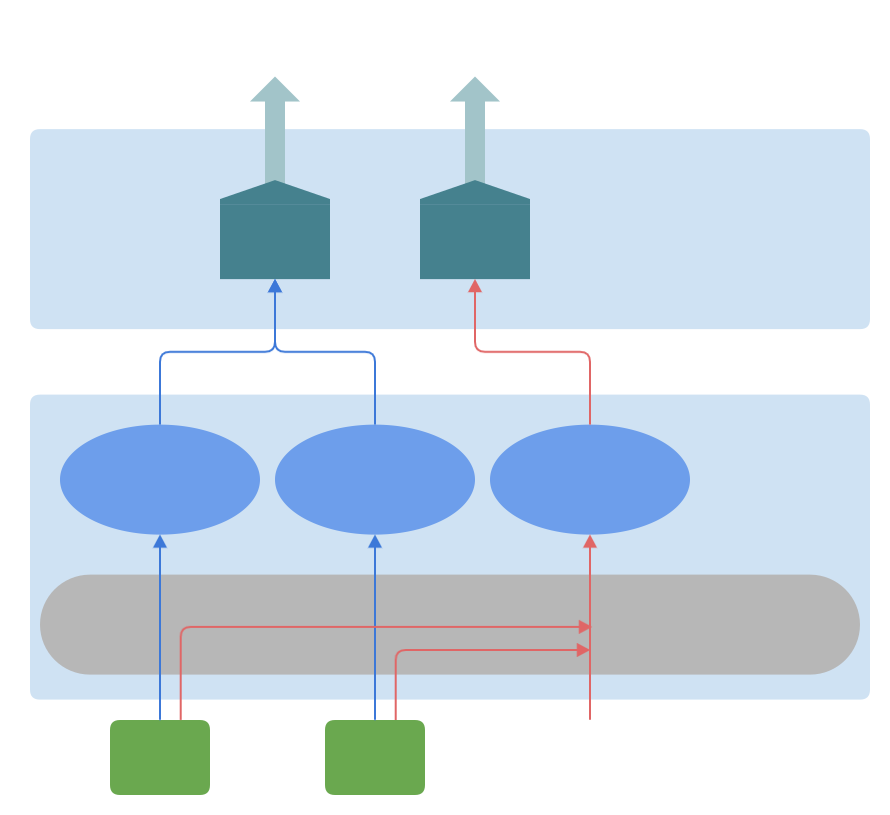
The diagram “Notification 2.0 topics and subscriptions” below shows three subscriptions that have been created in Cumulocity and are forwarding notification messages into two topics in the Messaging Service.
The temperature topic is receiving measurements from the leftmost and centrally depicted subscriptions.
Both of these have a “mo” (managed object) context and they both include messages from the measurement API only.
A subscription with a managed object context can only forward messages from a specific managed object (such as a device).
The leftmost subscription is forwarding measurements from a device with source ID 12345 and
the centrally depicted subscription does the same but from device 67890.
The alarms topic is receiving alarms from the rightmost subscription. It has a tenant context and includes messages from the alarm API. It forwards all alarms within the tenant that creates the subscription, regardless of how they are generated (you can create finer grained topics by using filters).
The forwarded alarms include those raised by Cumulocity itself, and those published via REST or MQTT from other components in, or attached to, the platform, including any alarms raised by the depicted devices.
Notification 2.0 Service Quotas
Messages processed by Notifications 2.0 are stored persistently by the Cumulocity Messaging Service until they have been delivered to, and acknowledged by, all interested consumers.
To optimize resource usage, the Messaging Service imposes storage limits and a message time-to-live (TTL) on persistently stored messages.
See the service quotas documentation for details of the default limits. These limits are configurable on a per-tenant basis. If your use case requires a different configuration, or if you have any questions or concerns, please contact product support.
Message backlog quota
Persistent messages are stored in a backlog until they are delivered to a destination consumer client attached to each consumer on a topic. The maximum size of a backlog is determined by the backlog quota limit, which directly affects the number of messages that can be stored and therefore the resource consumption of the platform.
For Notifications 2.0, a separate backlog exists for every subscription name - that is, for every distinct topic - used with the /notification2/subscriptions API. This backlog is shared by all consumers using the same topic, and by all consumer clients attached to each topic. If the quota limit is reached, no new messages can be added to the backlog until some older messages have been delivered, or deleted due to their TTL expiring.
If the backlog for a Notifications 2.0 topic has reached its quota limit, any API request to the Cumulocity platform that would be published onto that topic will receive HTTP response code 500.
For example, a POST request to the /measurement/measurements API endpoint will return the 500 response code if there is a topic that should receive that message, but cannot do so because its backlog is full.
Note that for requests using the PERSISTENT processing mode, the Cumulocity operational store will still be updated.
This can lead to duplicated entries in the operational store if applications blindly retry failed requests.
Message time-to-live
Any undelivered messages will be automatically deleted if they have been on the backlog for longer than the TTL limit. This policy helps to limit overall resource usage and reduces the need to process outdated data after a prolonged disconnection of a consumer.
No message will ever be deleted from the backlog unless it reaches its TTL limit. Messages will always be delivered to the consumer in the order they were published to the topic.
Best practices to ensure reliable operation
These best practices will help to ensure that Notifications 2.0 can reliably deliver messages to consumers, and avoid requests failing due to reaching the backlog quota limit:
- Consumers with messages unconsumed and unacknowledged is a common reason for backlogs to fill up, often leading to the unexpected failure of apparently unrelated Cumulocity platform requests. Therefore, monitor all attached consumers and ensure that messages are processed and acknowledged promptly. The monitoring & management capability provides a convenient way to monitor topics and consumers.
- If messages are published but unacknowledged within the TTL and the backlog is full, consider requesting a larger backlog quota or TTL. Higher message rates might require a larger backlog to cope with reasonable levels of unconsumed and unacknowledged messages by attached consumers. For slow consumers, a larger TTL may be required to prevent messages from being deleted before they can be delivered.
- Consider adjusting the filters on Notifications 2.0 subscriptions to send fewer messages, if this can be done while still delivering all the necessary messages to consumers.
Consumers and tokens
A topic’s notification messages can be received by WebSocket-based consumers that present a valid authorizing token for that specific topic when connecting to the Notification 2.0 WebSocket endpoint. This token is in the form of a string conforming to the JWT (JSON Web Token) standard. Tokens can be obtained from the Cumulocity token REST API by authenticated users.
Consumers receive the topic messages reliably, with at-least-once semantics, in order and must acknowledge each message in turn. Notification order is preserved from the point of view of any given device sending in REST and MQTT API requests. The protocol is text-based and described in detail in the Consumer protocol section. In typical usage, multiple consumers of a given topic operate independently in parallel, each receiving and acknowledging separate copies of those messages.
In this documentation, a consumer is a persistent registration of interest in the messages on a topic. A consumer client is a message receiver, connected to a consumer, that can read and acknowledge the messages for that consumer. When a consumer is created, the Messaging Service will retain messages on the backlog for the relevant topic, up to the limit of the backlog quota. A consumer is created implicitly when the first consumer client is connected to it, but it must be explicitly deleted when no longer required. Consumer clients may be connected or disconnected at any time without affecting message retention for the consumer.
It is important to manage consumers carefully as they can place significant storage resource demands on a system. Only create consumers if the messages will be consumed, and unsubscribe them if they are no longer needed or not needed for long periods. Unsubscribing is an explicit action - disconnecting a consumer client does not unsubscribe it. See the Consumer lifecycle section for more details.
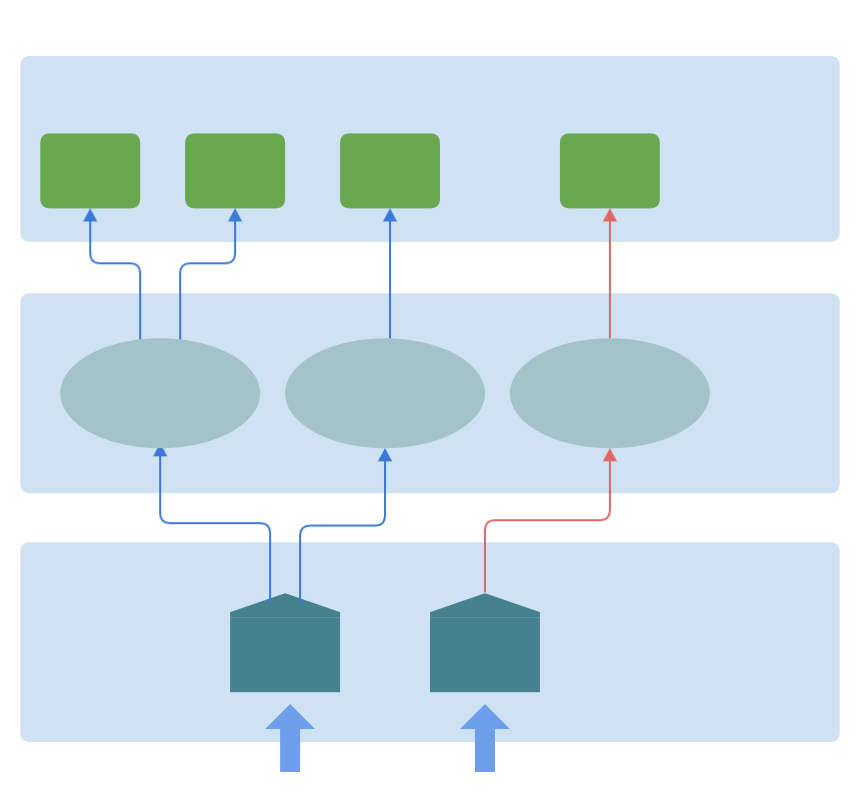
The diagram below shows three consumers that have been created in the Messaging Service by four consumer clients.
The rightmost client identifies its consumer as “alarmmonitor” and that consumer receives messages from the alarms subscription topic.
The second to right client identifies its consumer as “tempaudit” and that consumer receives messages from the temperature subscription topic.
The leftmost two consumer clients are two shares of a (logically single) shared consumer,
and so share the same copy of topic messages. They both identify the same “tempmonitor” consumer; each receives a non-overlapping subset of the messages in the temperature topic.
Collectively, they receive all of the messages in the topic.
Consumer lifecycle
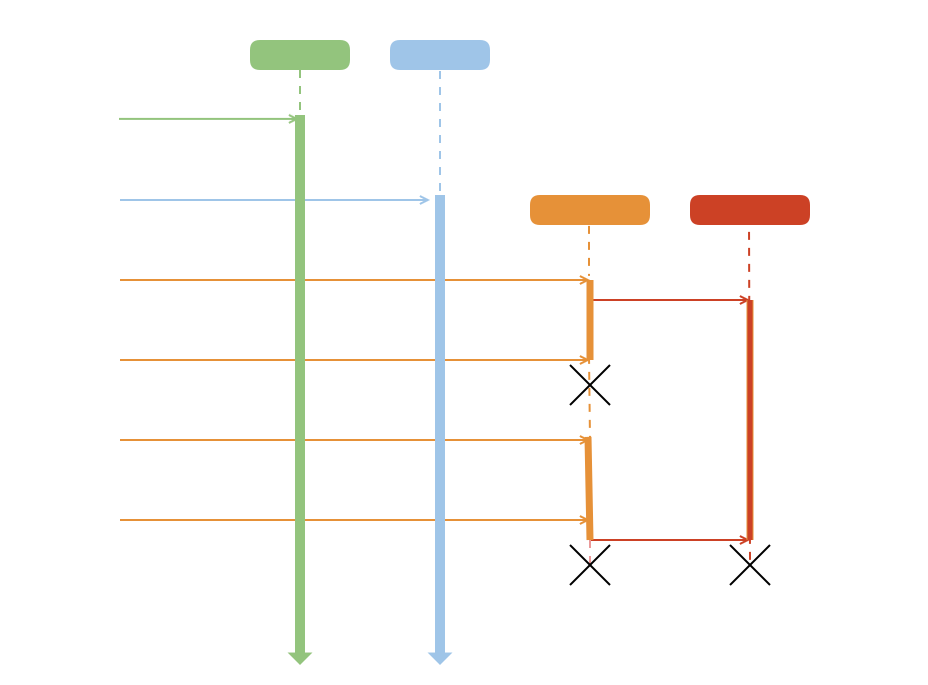
When a subscription is created, Cumulocity starts to create and forward notifications within the subscription’s scope to the Messaging Service subsystem. The Message Service does not necessarily retain these messages; it only retains a subscription topic’s messages if the topic is persistent, and it has at least one consumer for the topic that is or has been connected.
The set of retained topic messages that have not been received and acknowledged by a given consumer are known as the consumer’s backlog.
Only consumers of persistent subscription topics have backlogs that are maintained across client reconnections.
Consumers of non-persistent subscription topics get a new backlog pointing only to the next (latest) topic message when they connect/reconnect and any previous backlog is discarded, removing any message references. They can only cause backlog size problems if they remain connected but continually consume at a rate lower than the rate at which new messages arrive.
Persistent subscription topic messages are only stored once in the Messaging Service, but all associated consumers’ backlogs, whether the consumer is connected or not, reference each message until they have received and acknowledged it. Therefore, all consumer backlogs should be considered to have a storage cost from when they first connect until they explicitly express no further interest in the topic by unsubscribing. The Messaging Service discards a given message only when there are no backlogs that reference it anymore.
The following diagram shows the lifecycle of a consumer backlog in relation to its associated client connection(s). The backlog is created when the consumer first connects to the Messaging Service and is only destroyed when it is explicitly unsubscribed. The consumer’s backlog is maintained, even if its client connection is interrupted. This is needed for reliable messaging, allowing the consumer to not miss messages during connection outages, but comes at the cost of explicit lifecycle management.
To unsubscribe its consumer, pass its token as the token parameter to the /notification2/unsubscribe REST endpoint.
Creating subscriptions
The JSON fields sent in a create subscription request determine which Cumulocity messages are forwarded to a topic, and the forwarded message content. This request must be made by an authenticated Cumulocity user with the ROLE_NOTIFICATION_2_ADMIN permission.
The context field broadly determines the type of Cumulocity message a subscription might match and forward.
There are two valid context values: “mo” (managed object) and “tenant”. Some subscription fields have
constraints that vary according to the value of the context field. Where this is the case, it is pointed out in that field’s
documentation in the create subscription documentation.
The source field can only be used if the context is “mo”. It must have a nested id field containing the
value of a managed object’s global identifier (sometimes referred to as a “device ID” or “source ID”).
This is used to target inclusion of messages from the given managed object.
subscription is the first of two fields that identify which topic this subscription will forward messages to.
Multiple subscriptions contribute to a single topic if they have the same values for both the subscription and nonPersistent fields.
The nonPersistent field determines if the topic is persistent or non-persistent.
Subscriptions with the same subscription field value, but different nonPersistent values forward to two different topics.
It is, therefore, the second of the two fields that identifies the subscription topic.
The filter field can provide a subscription filter, allowing more finely
grained selection of the included messages, based on the message type and API (is it a measurement or alarm, for example).
The fragmentsToCopy field allows the forwarded messages to be transformed so that they contain only a specific subset of the fragments present in the original Cumulocity messages they are generated from. This can be useful, for example, for security, bandwidth saving or functionality scoping reasons.
The following summarizes the subscription fields.
| Field name | Value | Required/Default | Description |
|---|---|---|---|
| context | "mo" or "tenant" | Required | Only values "mo" and "tenant" are supported |
| source | A managed object global identifier | Required if context is "mo" | Has a mandatory child id field |
| subscription | String | Required | Determines messaging-service topic used |
| nonPersistent | Boolean | false | Determines if a persistent or non-persistent topic is used |
| filter | JSON object | All messages | Includes messages based on message values |
| fragmentsToCopy | JSON list of strings | All fragments | Determines which fragments are included in forwarded messages |
Notifications for new managed objects creations can never be forwarded by subscriptions with an “mo” context as the managed object is only given an ID when it is created and that ID is needed as a field to create the subscription.
Therefore, to receive notifications informing of new managed object creations, create a subscription with “tenant” context to listen for them.
An application can use this to discover new managed objects.
It can then choose to create subscriptions with “mo” context for those managed objects.
Subscriptions with “tenant” context can also use the measurements API, the alarms API, the events API, and/or the operations API to forward all measurements, alarms, events, and/or operations, respectively, which occur within the tenant, applying filters as desired.
The following table summarizes the context and API support:
| Context | Managed object create | Managed object update & delete | Alarms | Events | Measurements | Operations |
|---|---|---|---|---|---|---|
mo |
✗ | ✓ | ✓ | ✓ | ✓ | ✓ |
tenant |
✓ | ✗ | ✓ | ✓ | ✓ | ✓ |
measurements API must be selected explicitly in the tenant context; it is not included by the * wildcard API selector.Subscription filters
Subscription filters provide fine-grained selection of the Cumulocity messages a subscription will forward.
Filters can be provided as the subscriptionFilter field in a subscription’s JSON object at creation time.
It is a JSON object with apis and typeFilter fields.
Filters can provide either or both filter fields.
The apis field is a JSON array that specifies which Cumulocity API messages to include.
Use an array containing just the wildcard value, “*”, to include messages from all supported APIs.
To include messages from a subset of the APIs, use an array containing any single or multiple selection from
“alarms”, “alarmsWithChildren”, “events”, “eventsWithChildren”, “measurements”, “managedobjects” and “operations”.
See the table above for details of the API support in each context.
For example, to include messages from all APIs:
{
  "context": "mo",
  "subscription": "subscription01",
  "source": {
    "id": "2468"
  },
  "filter": {
    "apis": ["*"]
  }
}
To include only messages from the measurements and alarms APIs:
{
  "context": "mo",
  "subscription": "subscription02",
  "source": {
    "id": "2468"
  },
  "filter": {
    "apis": ["measurements", "alarms"]
  }
}
The “alarmsWithChildren” and “eventsWithChildren” apis values allow subscriptions with managed object context
to filter in, respectively, alarms or events for all recursively descendant child managed objects of the source.id managed object in addition to those from the source.id managed object itself.
The typeFilter string field is matched against the original message’s type field. It can be a single value, or a
limited (supporting only or) OData expression.
For example, to include messages with type “temperature” and messages with type “pressure”:
{
  "context": "mo",
  "subscription": "subscription03",
  "source": {
    "id": "2468"
  },
  "filter": {
    "type": "'temperature' or 'pressure'"
  }
}
To include messages of type “temperature” only:
{
  "context": "mo",
  "subscription": "subscription04",
  "source": {
    "id": "2468"
  },
  "filter": {
    "type": "'temperature'"
  }
}
Persistent and non-persistent subscriptions
A subscription can be persistent or non-persistent, implying that the Messaging Service topic for it is either persistent or non-persistent, respectively. These have different qualities which can be useful to satisfy the varying needs of differing use cases.
Persistent subscriptions are the default. They are used for reliable messaging, ensuring that consumers never miss a message if their connection is interrupted. They use replicated secondary storage to maintain backlogs (within the constraints of any configured storage limits) and to maintain the consumers’ positions in their topics. When a consumer of a persistent subscription topic has their connection interrupted, whether that is due to network issues or deliberate actions by the consumer, upon reconnection they will continue to receive notifications from the topic position they were at before the outage (specifically, from the message after the last one they acknowledged successfully before the outage).
Non-persistent subscriptions are only buffered in memory. A client consumer’s position is not persisted across interruptions of the client connection. When a consumer of a non-persistent subscription has their connection interrupted, upon reconnection they will start receiving notifications from the most recent message of the subscription, missing all other notifications that occurred during the connection outage. This is the case for all such temporarily disconnected consumers, even if other consumers of the same non-persistent subscription are still receiving older messages that occurred while it was not connected.
If you create both a persistent and a non-persistent subscription with the same subscription field, they are separate, independent subscriptions, backed by separate topics.
When creating a token for a non-persistent subscription topic, to access notifications from the correct topic, the token’s nonPersistent field must be set to true.
As is the case for the subscription, this field defaults to false, meaning the token will be for a persistent subscription topic by default.
Deleting subscriptions
Deleting a subscription prevents it from adding further notification messages to its associated topic. Many subscriptions can contribute notifications to a given topic so this does not control the topic lifecycle. Deleting all the subscriptions associated with a topic ensures no more notifications are added to it. This does not delete the topic either.
Even though the topic no longer accumulates new messages, there may still be consumers draining the last of the messages from it. When all messages are consumed by all consumers, the topic is empty and consumes negligible space in the Messaging Service.
Subscriptions can be deleted by sending a delete subscription request, using the subscription’s id as the URL filename. For example, to delete the subscription with ID 8765:
 DELETE /notification2/subscriptions/8765 HTTP/1.1
 Host: <HOST>
 Authentication: Basic: <AUTHENTICATION>
When a tenant is deleted from Cumulocity, all its subscriptions are deleted. However, topics and consumers may still be active in the Messaging Service until all messages are consumed.
Creating tokens
The JSON fields sent in a create token request determine which subscription topic a consumer can receive messages from, the token’s duration, the shared nature of the consumer, and an identifier for the consumer. This request must be made by an authenticated Cumulocity user with the ROLE_NOTIFICATION_2_ADMIN permission.
The subscription field aligns with the same field in the subscription object, so broadly specifies the subscription
topic the consumer will receive notifications from. The nonPersistent field is also a factor in identifying the topic.
The nonPersistent field aligns with the same field in the subscription object so identifies whether the subscription topic is persistent or non-persistent and therefore is a factor in identifying the topic only.
There is no such thing as a persistent or non-persistent consumer and tokens cannot affect the nature they experience of topics using this field.
The subscriber field provides a unique (within the scope of this topic) identity for the consumer, allowing
it to be recognized across connection interruptions, so allowing message delivery to be resumed after such interruptions and thus be reliable.
subscriber field refers to the consumer, a named, persistent registration of interest in the messages on a topic.
See consumers and tokens for more details.The shared field determines if multiple clients can connect in parallel as the consumer identified in the
subscriber field, acting collectively to share the notification message processing load.
The expiresInMinutes field is the period that this token remains valid for, defaulting to 1440 minutes (1 day).
The following summarizes the token fields.
| Field name | Value | Required/Default | Description |
|---|---|---|---|
| subscription | string | Required | Identifies topic |
| nonPersistent | Boolean | false | Must be true to identify a non-persistent topic |
| subscriber | String | Required | Identifies the consumer bearing this token |
| shared | Boolean | false | True if multiple clients can act collectively as this consumer |
| expiresInMinutes | Integer | 1440 | The token duration |
Token expiration
The period a token remains valid for (its lifetime) is determined at creation time by the optional expiresInMinutes field, which defaults to 1440 minutes (one day).
This can be used to limit exposure to potential security issues related to them being leaked to parties that are not authorized to access the system. Consequently, tokens may need to be re-created or refreshed periodically.
Tokens only allow a consumer to connect to the Messaging Service. If a token expires while its consumer is connected, the consumer is not automatically logged out or disconnected.
If a consumer disconnects, and their token has expired, the token must be recreated or refreshed in order that the consumer can reconnect.
Tokens can be refreshed by calling the token create request with the same parameters as originally (a different expiresInMinutes value can be given if a different duration is desired).
The token string is a JWT token so if the parameters used are not easily kept available, they can be extracted from the token string as outlined in the Java code below:
// The token string's sections are delimited by dots
String[] tokenParts = token.split("\\.");
// Base64 decode the second section
byte[] decoded = Base64.getDecoder().decode(tokenParts[1]);
// Create a string from the decoded bytes to get a JSON string of the token fields
String tokenJson = new String(decoded);
// ... optionally create an Object from the string or bytes using a JSON  parser
If you are using the Cumulocity Java SDK TokenApi class, it has a public refresh method which does the above for you, internally on the client side.
Shared consumer tokens
Shared consumer tokens allow parallelization of the consumer client workload. This is useful if the notifications would otherwise arrive at a higher rate than a single consuming client application can process them. It has no impact on the rate of notification throughput within, and thus their egress from, Cumulocity core.
When you create a token, you can add the optional boolean body parameter shared to the request.
If it is set to true, the created token is shared.
If it is not present or false, the token is exclusive (not shared).
If a consumer’s token is not shared, the consumer is an exclusive consumer. Only one consumer client can connect using an exclusive token. An attempt to connect further consumers with the same exclusive token results in an error. An exclusive consumer receives a copy of all notifications from the subscription topic its token is for.
If a consumer’s token is shared, the consumer is a shared consumer. Additional consumer clients can connect using the same token. If only one shared consumer client is connected, it receives a copy of all notifications from the subscription topic. As additional consumer clients connect using the same token, the consumer notification load is rebalanced so that each consumer client receives a non-overlapping subset (share) of the notifications from the subscription topic. The set of consumer clients sharing a token can be thought of as a single logical consumer. Collectively, the set receives all notifications for the subscription topic.
The notification load is spread across the shared consumer clients according to the id of the source that generated the notification, typically a device id.
All notifications for a given id are delivered to the same consumer. Each consumer may receive notifications for many different ids.
This means that there is no benefit using shared tokens unless the notifications feeding the subscription topic are coming from multiple sources.
Note that the load spreading algorithm may result in an asymmetric balance of notification load across the shares when there are few source ids in the subscription topic.
The load should generally become more evenly distributed as the number of sources increases.
To keep the messages from a given set of source ids “sticky” to a specific consumer client in the share in the face of connection interruptions, the consumer clients can provide an optional consumer parameter in their connection URL string, in addition to their usual token parameter.
For example: two consumer clients identifying themselves as “instance1” and “instance2” connect using URL paths
notification2/consumer?token=xyz&consumer=instance1 and notification2/consumer?token=xyz&consumer=instance2.
Subscriptions are always unaware of the nature and number of their consumers: any number of shared and exclusive tokens can be created for the same subscription topic and they all operate independently, each receiving their own copy of the notifications. This means you can have multiple shared tokens for the same subscription topic and their load is only divided within the scope of each shared token.
Note the following points to avoid unexpected behaviour when using shared consumer tokens:
- The
consumerparameter to thenotification2/consumerAPI endpoint provides a name for the consumer client, not the consumer. The consumer name is encoded within the token string and does not have to be explicitly provided again. - Multiple consumers on a topic operate independently, with each receiving their own copy of the notifications. With shared consumers, this means that the distribution of notifications across consumer clients may be done differently for each consumer.
- Messages received by a shared consumer client must be acknowledged on the same WebSocket connection. Attempting to acknowledge a message received by one consumer client on the connection used by a different client will not work. The message will not be acknowledged and will remain on the backlog, potentially causing the topic backlog quota limit to be reached.
Building consuming applications and microservices
A consumer client requires only a valid URL and JWT string to connect. It can be implemented using any WebSocket library or programming language as the protocol is text-based and relatively simple. The implementation can be a microservice running internally to, or an application running externally from, Cumulocity.
Java developers do not need to code to the protocol specification directly. The API and the protocol have been implemented in the Cumulocity Clients Java API. Examples using that can be found in the cumulocity-examples repository.