# Alarm mapping
Source: https://cumulocity.com/docs/standard-tenant/alarm-mapping/
Sector: Platform administration
Release: Latest
Alarm mapping enables you to change the severity and text of alarms to adapt them to your business priorities. For example, a loss of the connection to a device is by default a MAJOR alarm but may be critical to you. To change this, add an alarm mapping to change alarms related to connection losses to CRITICAL.
> **Requirements:**
> ROLES & PERMISSIONS:
>
> - To view alarm mappings: READ permission for the permission type "Option management".
> - To manage (create, edit, or delete) alarm mappings: ADMIN permission for the permission type "Option management".
>
> For easier user access management, the above permissions are included in the global role created by default in every new tenant:
> - Tenant Manager - manages tenant-wide configurations like applications, tenant options and business rules.
> **Related topics:**
> - [Device management & connectivity > Device Management application> Monitoring and controlling devices > Working with alarms](https://cumulocity.com/docs/device-management-application/monitoring-and-controlling-devices/#working-with-alarms) for information on working with alarms in general.
> - [Alarms](https://cumulocity.com/api/core/#tag/Alarms) in the Cumulocity OpenAPI Specification for details on managing alarms via REST.
### To view alarm mappings {#to-view-alarm-mappings}
Click **Alarm mapping** in the **Business Rules** menu to see a list of all alarm mappings.
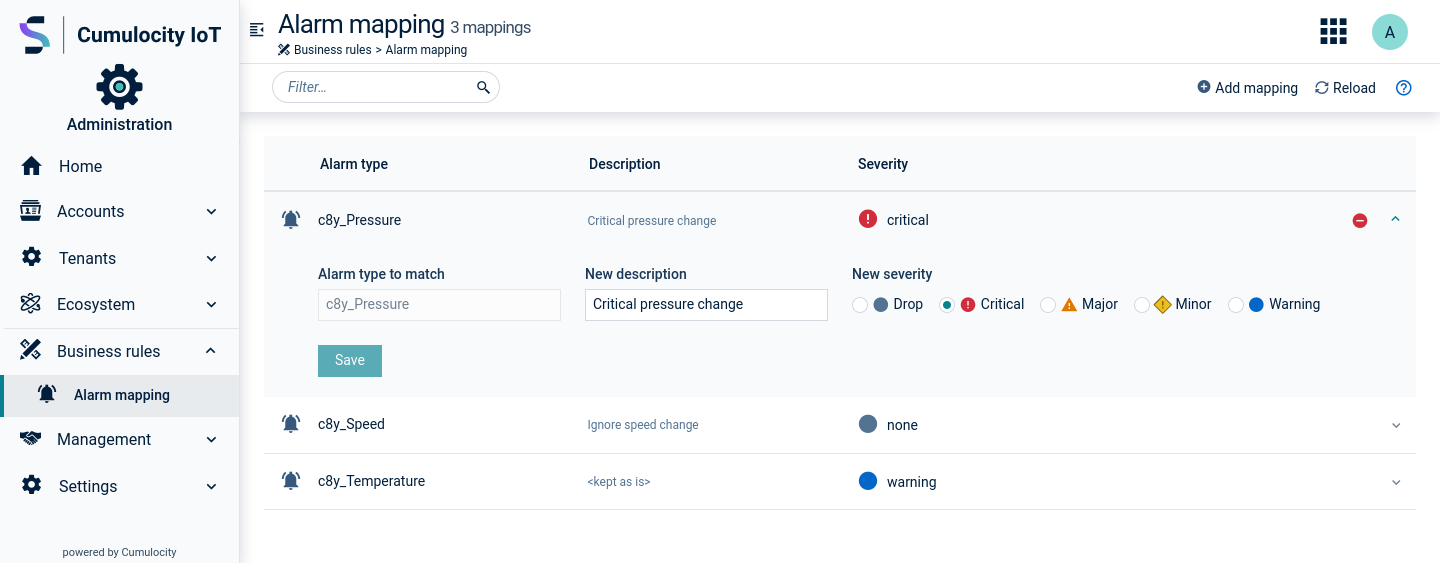 For each alarm mapping, the alarm severity, the alarm type and a description (optional) are shown.
### To add alarm mapping {#to-add-alarm-mapping}
1. Click **Add alarm mapping** in the top menu bar.
2. Enter the alarm type to be modified.
3. In the **New description** field, optionally enter a new description for the alarm. If you leave this field empty, the original text from the alarm will be kept.
4. Select the desired new severity, or select "Drop" to not show the alarm at all.
5. Click **Save** to save your settings.
> **Info:**
> The alarm type provided as an alarm mapping is interpreted as alarm type prefix: "<type-prefix>*". If you create, for example, an alarm mapping to address alarms of type "crit-alarm", the mapping is effective for any type of alarm that starts with this value, for example, "crit-alarm-1", "crit-alarm-2", or "crit-alarm-xyz".
### To edit an alarm mapping {#to-edit-an-alarm-mapping}
Expand an alarm mapping to edit it. You may modify the description and the alarm severity. The alarm type is not editable.
> **Info:**
> Refresh the list to discard any changes without saving.
### To delete an alarm mapping {#to-delete-an-alarm-mapping}
To delete an alarm mapping, hover over it and click the remove icon which appears on hovering over the row.
For each alarm mapping, the alarm severity, the alarm type and a description (optional) are shown.
### To add alarm mapping {#to-add-alarm-mapping}
1. Click **Add alarm mapping** in the top menu bar.
2. Enter the alarm type to be modified.
3. In the **New description** field, optionally enter a new description for the alarm. If you leave this field empty, the original text from the alarm will be kept.
4. Select the desired new severity, or select "Drop" to not show the alarm at all.
5. Click **Save** to save your settings.
> **Info:**
> The alarm type provided as an alarm mapping is interpreted as alarm type prefix: "<type-prefix>*". If you create, for example, an alarm mapping to address alarms of type "crit-alarm", the mapping is effective for any type of alarm that starts with this value, for example, "crit-alarm-1", "crit-alarm-2", or "crit-alarm-xyz".
### To edit an alarm mapping {#to-edit-an-alarm-mapping}
Expand an alarm mapping to edit it. You may modify the description and the alarm severity. The alarm type is not editable.
> **Info:**
> Refresh the list to discard any changes without saving.
### To delete an alarm mapping {#to-delete-an-alarm-mapping}
To delete an alarm mapping, hover over it and click the remove icon which appears on hovering over the row.